Blog / Morrison, TN Ford Dealer

5 Family-Friendly Features of the 2021 Ford Transit Connect Passenger Wagon

Black 2021 Ford Transit Connect Passenger Wagon
What makes a good family-hauling vehicle? Parents have a long list of requirements, from plenty of space and advanced safety equipment to entertainment options. Get to know five family-friendly features of the affordable 2021 Ford Transit Connect Passenger Wagon.

1. Versatile Cabin

The beauty of the 2021 Ford Transit Connect Passenger Wagon is that it's suited for families and can comfortably transport up to seven people across three adult-friendly rows. This passenger wagon's seats sit low, offering a more car-like experience, and delivers plenty of headroom due to its tall profile. The vehicle is engineered to withstand everyday family life challenges with a cabin that favors function over form with durable, easy-to-clean surfaces and comfort features such as dual-zone automatic climate control. Upgrade with luxurious touches which include leather upholstery, heated front seats, and a power-adjustable driver's seat.

2. Kid-Friendly Technology

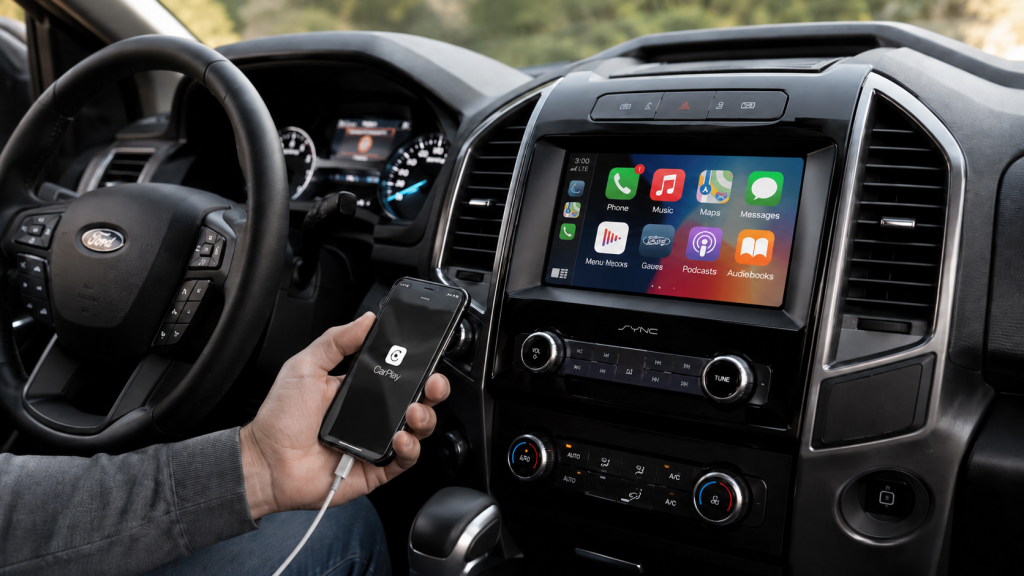
Get your Ford Transit Connect set up with the latest in advanced technology. The kids will love Ford's SYNC 3 software. This system comes with a 4.2- or 6.5-inch central display screen and smartphone connectivity courtesy of Apple CarPlay and Android Auto. A 4G LTE Wi-Fi hot spot provides connectivity for 10 devices. Mom and dad can take advantage of the available integrated navigation system; a premium audio system includes a CD player and wireless device charging.

3. Nimble Handling

Whether you're hitting the road to take the kids to see grandmom and granddad or carpooling the kids to school, what you drive matters. The 2021 Ford Transit Connect Passenger Wagon's nimble driving characteristics allow you to maneuver crowded streets and into narrow parking spaces easily. In addition to agility, the Ford Transit Connect Passenger Wagon touts light, accurate steering. Thanks to its small size, the vehicle remains poised around sharp turns.

4. Robust Performance

Ford released the 2021 Transit Connect Passenger Wagon with your choice of two optional four-cylinder engines. The base 2.5-liter version pairs with a six-speed automatic transmission. This engine earns a fuel-efficient 24 mpg in the city and 27 mpg on the highway. Opt for the 2.0-liter turbocharged four-cylinder engine that Ford unites with an eight-speed automatic transmission. You'll get 20 mpg in the city and 27 mpg on the highway. Upgrade to the larger engine and add the Trailer Tow package to unlock 2,000 pounds of towing capacity—that's enough to pull a small pop-up camper to the lake house.

5. Parent-Approved Safety Features

Parents will love the 2021 Ford Transit Connect Passenger Wagon's standard safety features. From forward-collision warning to automated emergency braking, this vehicle helps keep your precious passengers safe along the way. Add the confidence of Ford's comprehensive suite of optional driver assistance technologies called Co-Pilot360. This vehicle's safety amenities include automatic high beams, lane-keeping assist, lane-departure warning, rear cross-traffic alert, and blind-spot monitoring. All these safety advancements will have you feeling like you're a parent of the year. Choosing the perfect family vehicle is all about finding the right features at the right price. Visit Reddick Brown Ford today and discover everything the 2021 Ford Transit Connect Passenger Wagon has to offer. Image via ford.com
Posted in:

Related Posts

How to Connect Ford SYNC: Apple CarPlay Setup Guide

How to connect Ford SYNC starts with knowing which phone connection your Ford supports. Additionally, Bluetooth handles calls and audio without placing phone apps on the touchscreen. By contrast, Apple CarPlay brings supported iPhone apps onto the Ford display. Android Auto does the same for supported Android apps. Therefore, the first step is choosing the correct connection. Furthermore, your Ford may use SYNC 3, SYNC 4, or SYNC 4A. Therefore, each version uses different menus and phone pairing steps. Newer versions may support wireless phone projection. SYNC 3 usually uses a USB cable for Apple CarPlay or Android Auto. This walkthrough explains each path in clear order. It also covers music, maps, calls, messages, and common connection trouble. Murfreesboro owners can use these steps before contacting the dealership for added support. Which Ford Phone Connection Should You Choose? Bluetooth pairing links your phone with the Ford screen for calls and audio. It does not always open Apple CarPlay or Android Auto. Those phone projection tools require separate setup steps. So, do you need Bluetooth, Apple CarPlay, or Android Auto? Start with the task you want to complete. Bluetooth works well for calls and streamed music. Apple CarPlay brings supported iPhone apps onto the Ford display. Android Auto brings supported Android apps onto that display. more In addition, phone projection gives you access to supported maps, messages, podcasts, and voice controls. It may use a cable or wireless connection. Your Ford screen and phone model control which path appears. Before starting, place the vehicle in Park. Turn on the Ford screen and unlock your phone. Then, switch on Bluetooth. For wireless projection, also switch on Wi Fi. Still, basic Bluetooth pairing may be enough for some owners. It gives access to calls and audio without opening a new screen layout. Phone projection offers a fuller app view through the Ford display. Find Your Ford SYNC Version Your SYNC version controls the menu names and connection path. Therefore, finding the version first prevents wasted steps. SYNC 3 uses a wide touchscreen with a lower menu bar. The menu usually includes Audio, Phone, Navigation, Apps, and Settings. Apple CarPlay and Android Auto usually start through a USB cable. SYNC 4 and SYNC 4A use newer screen layouts. These versions may support wireless Apple CarPlay and Android Auto. Some vehicles also support wired connections through a USB port. You can check the Settings menu for a SYNC information screen. Additionally, the vehicle owner manual may name the installed version. In addition, Ford support resources can match instructions with your model and model year. Why does the version matter? A SYNC 3 owner may search for a wireless menu that never appears. A SYNC 4 owner may connect without keeping the phone plugged in. Clear version matching keeps the process simple. Connect an iPhone Through Apple CarPlay Apple CarPlay places supported iPhone apps on the Ford touchscreen. It supports maps, calls, messages, music, podcasts, and Siri voice control. First, make sure Siri is active on the iPhone. Then, unlock the phone before beginning. Use an Apple approved cable for wired setup. Connect the cable directly to the vehicle USB port. Next, watch the Ford screen for an Apple CarPlay prompt. Accept the terms on both screens. The CarPlay layout should then replace the standard phone screen. For wireless setup, start with Bluetooth and Wi Fi turned on. Open the Ford phone menu and add a new device. Select the vehicle name on the iPhone. Confirm the matching code on both screens. After Bluetooth pairing, the Ford screen may ask about wireless Apple CarPlay. Accept that prompt to open the CarPlay layout. The iPhone may also request access to contacts, messages, or notifications. What should you check when CarPlay does not open? Start with the USB cable and port. Then, confirm Siri, Bluetooth, Wi Fi, and CarPlay permissions. Also check whether another saved phone connects first. Once connected, open Maps, Phone, Messages, Music, or Podcasts from the Ford screen. Siri can handle many tasks through voice commands. Keep attention on the road and use voice control when possible. Connect an Android Phone Through Android Auto Android Auto places supported Android apps on the Ford touchscreen. It supports navigation, calls, messages, music, podcasts, and Google Assistant. Start by unlocking the phone. Turn on Bluetooth. For wired setup, connect a reliable USB cable to the correct vehicle port. A charging only cable may not transfer app data. Then, accept the prompts on the phone and Ford screen. The phone may request access to contacts, messages, location, and notifications. Those permissions support calling, messaging, maps, and voice commands. For wireless setup, keep Bluetooth and Wi Fi turned on. Add the phone through the Ford phone menu. Confirm the matching code. Then, approve the Android Auto prompt on both screens. Android Auto may open without a separate app icon on newer phones. The feature is part of the phone software on many Android versions. Therefore, use phone settings to review permissions and connection history. If Android Auto stays hidden, disconnect the cable and restart both devices. Then, test another data cable. Also remove old vehicle records from the phone. Remove old phone records from the Ford screen as well. After connection, open Google Maps, Phone, Messages, or supported audio apps. Google Assistant can handle many requests through voice commands. Keep the phone stored securely while driving. Why Will Your Phone Not Connect to Ford SYNC? Connection trouble means one part of the pairing path is blocked. The cause may involve settings, permissions, cables, saved devices, or software. Begin with the simplest checks. Make sure the phone is unlocked. Confirm Bluetooth is on. Wireless projection also needs Wi Fi. Wired projection needs a data cable and working USB port. Use this order before resetting the Ford screen: Confirm the phone has current software, then restart the phone and vehicle. Test another data cable and another supported USB port. Delete saved pairings on both devices, then complete a fresh connection. Furthermore, check whether another phone connects first. Ford screens may favor a saved primary phone. Turn off Bluetooth on that device during testing. If music works but CarPlay does not, basic Bluetooth pairing is active. The projection setup still needs approval. Review CarPlay settings on the iPhone and phone list on the Ford screen. If calls work but Android Auto does not, review USB data access and phone permissions. Also check for a damaged cable. A cable can charge the phone while failing to transfer app data. When the connection drops during a drive, move the phone away from loose cables or blocked storage areas. Then, review battery saving settings. Some phone settings may stop wireless projection after the screen locks. Use Music, Maps, Calls, and Messages After Pairing A completed connection should support the phone tasks you selected during setup. Still, each task may require separate permission. For music, choose Bluetooth Audio, Apple CarPlay, or Android Auto from the Ford audio menu. Open the preferred audio app. Then, use the touchscreen, steering wheel controls, or voice control. For maps, open Apple Maps, Google Maps, or another supported navigation app. Enter the destination before driving when possible. Voice control can handle route changes without reaching for the phone. For calls, allow contact access during pairing. That permission lets the Ford screen show names and recent calls. Voice control can place a call through Siri or Google Assistant. For messages, approve notification and message access on the phone. The Ford screen may read supported messages aloud. Voice control can prepare a reply for review. In addition, check these permissions after a phone update. Updates may change privacy settings or remove prior approval. Reconnect the phone after reviewing those settings. Ford technology should make common tasks easier to reach. A clear setup order keeps phone pairing from becoming frustrating. Reddick Brown Ford can also assist Murfreesboro owners with model specific connection questions.


Ford Trucks for Drivers Who Like VelociRaptor, Shelby, and Baja-Style Capability

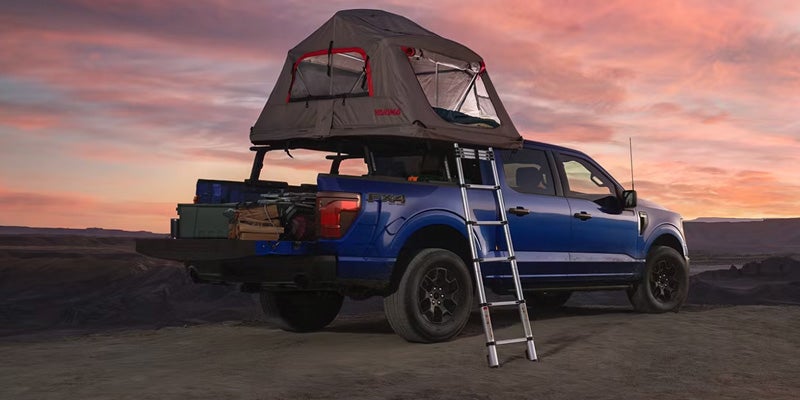
Searches for trucks like VelociRaptor, Shelby F-150, and Baja-style builds usually start with a specific feeling. Drivers want something that feels powerful, planted, and capable of handling more than a typical drive. What often gets overlooked is that those trucks are designed for extreme use cases. High-speed off-road driving, maximum output tuning, or heavily modified setups that are not always practical for daily use. Most drivers are not actually looking for extremes. They are looking for usable power, controlled suspension, and a truck that feels confident in a wide range of conditions. That is where the current Ford truck lineup delivers. Why Performance Trucks Appeal to So Many Drivers Many shoppers searching VelociRaptor or Shelby trucks are really asking what makes those trucks feel different. They are drawn to more • Strong and immediate acceleration when merging or passing • Suspension systems that absorb rough roads without losing control • A wider stance and tire setup that improves stability • A design that reflects strength and capability These qualities come from core engineering, not just aftermarket modification. Ford builds these characteristics into its trucks in a way that supports real-world driving instead of limiting them to extreme scenarios. How That Performance Feel Translates to Real Ford Truck Options Drivers searching for high-performance trucks are usually trying to match a specific type of capability. The difference is that Ford offers those capabilities through trims and packages designed for everyday use. Here is how that interest translates into Ford trucks available today Trim or Package Key Features Best For F-150 XLT Sport Appearance Dark grille, 20-inch wheels, sport seating surfaces Drivers who want a stronger visual presence without sacrificing daily comfort F-150 LARIAT with FX4 Off-Road Package Off-road tuned shocks, skid plates, electronic locking rear differential Drivers balancing job site demands with trail capability F-150 Tremor 33-inch all-terrain tires, Trail Control, lifted suspension tuning Drivers who want dedicated off-road capability with factory engineering F-150 Platinum PowerBoost hybrid system, upgraded interior materials, advanced driver assist features Drivers who want power, refinement, and long-distance comfort The appeal of performance trucks is not limited to specialty builds. It already exists in trucks designed to handle real driving conditions with more consistency and control. How Off-Road Capability Actually Works in Ford Trucks Many drivers ask what makes a truck feel capable off-road. Off-road capability is created through how the truck manages terrain, not just how much power it produces. The Ford F-150 Tremor and FX4-equipped models are designed to maintain control and traction in changing conditions. Key systems that make this possible include • Suspension travel that allows the wheels to move up and down independently, keeping tires in contact with uneven surfaces • Off-road tuned shocks that absorb impact and reduce bounce over rough terrain • Locking rear differential that distributes power evenly to both rear wheels when traction is limited • Terrain Management System that adjusts throttle, shifting, and traction control based on surface conditions The result is a truck that stays stable and predictable instead of reacting harshly to terrain changes. For drivers, that translates into confidence when driving on gravel roads, mud, or uneven job sites. How Ford Super Duty Trucks Deliver Real Strength Some drivers drawn to high-performance trucks are also trying to understand how that capability translates into real work. The Ford F-250 and Ford F-350 are engineered to manage weight and maintain stability under load. Their suspension systems are designed to support towing and hauling without excessive body movement, which improves control and driver confidence. Trims like the Ford F-250 XLT and LARIAT balance durability with everyday usability. Higher trims such as King Ranch and Platinum add interior refinement and driver assistance features that improve comfort during longer drives. This type of capability is often more relevant to everyday use than extreme performance builds. How Ranger and Maverick Fit Into Capability Not every driver needs a full-size or heavy-duty truck to get the capability they are looking for. The Ford Ranger offers a more compact platform with strong torque delivery and off-road readiness. It allows drivers to handle rough terrain while maintaining easier maneuverability in tighter spaces. The Ford Maverick focuses on efficiency and practical utility. It is designed for drivers who need a truck for light hauling, home projects, or daily commuting. Both models show that capability is not defined by size alone. It is defined by how well the truck supports your routine. Cost and Ownership Differences That Matter Over Time Many drivers comparing trucks like VelociRaptor or Shelby builds eventually ask what ownership actually looks like over time. The biggest difference most shoppers feel is financial, both upfront and long term. Factor VelociRaptor Style Build Factory Ford Truck Option Purchase Price Often $120,000 to $200,000 Typically $50,000 to $80,000 depending on trim Fuel Economy Often under 10 mpg due to tuning and weight Typically 15 to 20 plus mpg depending on engine and setup Insurance Higher premiums tied to modifications and value Standard rates based on production models Parts and Service Requires specialized shops or tuner support Serviceable through Ford-certified service centers Modified trucks often prioritize peak output and customization. Factory Ford trucks are engineered to balance power, efficiency, and long-term reliability. Choosing the Right Ford Truck Based on How You Drive Most shoppers searching high-performance trucks are trying to avoid choosing something that does not fit their needs. When comparing options, it helps to evaluate how the truck will be used most often • Daily driving and commuting → Ford F-150 XLT or LARIAT • Off-road capability with everyday usability → Ford F-150 Tremor • Towing, hauling, or heavy-duty work → Ford F-250 or F-350 • Smaller size with practical capability → Ford Ranger or Ford Maverick This approach shifts the decision away from labels and toward how the truck actually fits your lifestyle. What to Focus on Instead of Performance Labels Instead of focusing on names like VelociRaptor or Shelby, it is more useful to evaluate how a truck performs in real situations. Look at how the suspension responds to rough roads. How the truck delivers power when needed. How stable it feels under load. How comfortable it is during daily driving. When you choose based on how you actually drive, you end up with a truck that delivers capability you can rely on every day.

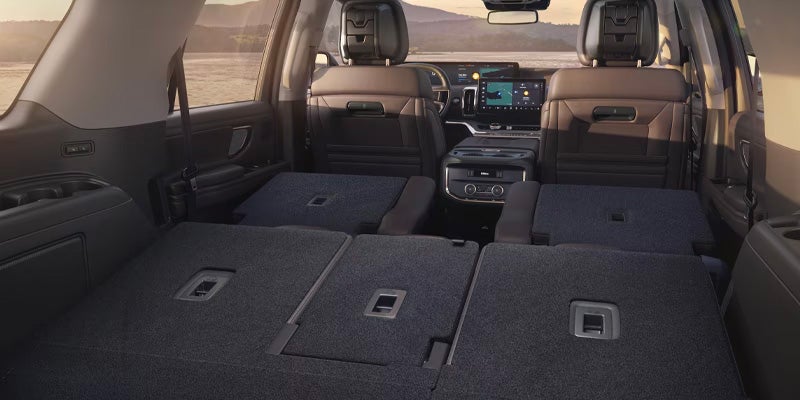
Interior of a 2025 Ford Expedition SUV with rear seats folded flat, showing space for cargo.

4 Impressive Aspects of the 2025 Ford Expedition

Families looking for the next vehicle to take them on a fun expedition need something roomy and practical, and strength is a bonus. The 2025 Ford Expedition meets all of that criteria, and it also has many more impressive features to explore. more 1. Two Roomy Sizes The Expedition is a spacious vehicle that can accommodate up to eight passengers and up to 123.1 cubic feet of cargo. You need a MAX version to fit that amount of cargo into the vehicle, and you have to fold down the second and third rows to use that space. If you only fold down the third row, then you have 84.5 cubic feet of space, and if you don't fold down any of the rows, then you've got a cargo space spanning 37.4 cubic feet. Non-MAX trims also have a lot of room for luggage, with 108.5, 69.9, and 22.9 cubic feet behind the first, second, and third rows, respectively. 2. Towing Prowess You're getting a towing capacity of at least 6,000 pounds no matter what configuration of the Expedition you buy. The 4x2 Expedition lets you tow up to 6,000 pounds, and the 4x2 MAX has a towing capacity of up to 6,300 pounds. Drivers who need more strength than that should consider one of the 4x4 models, as the regular 4x4 Expedition can haul up to 9,600 pounds, and its MAX counterpart has a towing capacity of up to 9,000 pounds. 3. Smart Safety Technology With standard features that include pre-collision assist, reverse brake assist, and blind spot assist, you can feel a little more secure as you drive. These features help you stay aware of potential hazards around the vehicle. Every trim also has a camera that lets you view the whole area around the SUV to check for hazards. 4. Entertainment and Convenience The 13.2-inch infotainment display in every Expedition offers convenience and entertainment in one system. The built-in Wi-Fi hotspot and standard SiriusXM with 360L give your passengers plenty of things to keep them occupied while you're driving. Connecting your smartphone to the system adds convenience, as you can use voice commands to access various smartphone features. You can also alter different vehicle settings hands-free. Get behind the wheel and test drive the Expedition at Reddick Brown Ford in Morrison, TN. Go to our website to schedule your test drive now.